 Whats
AI quiz solver · online trivia tool
AI quiz solver: the answer to any online quiz question in one click
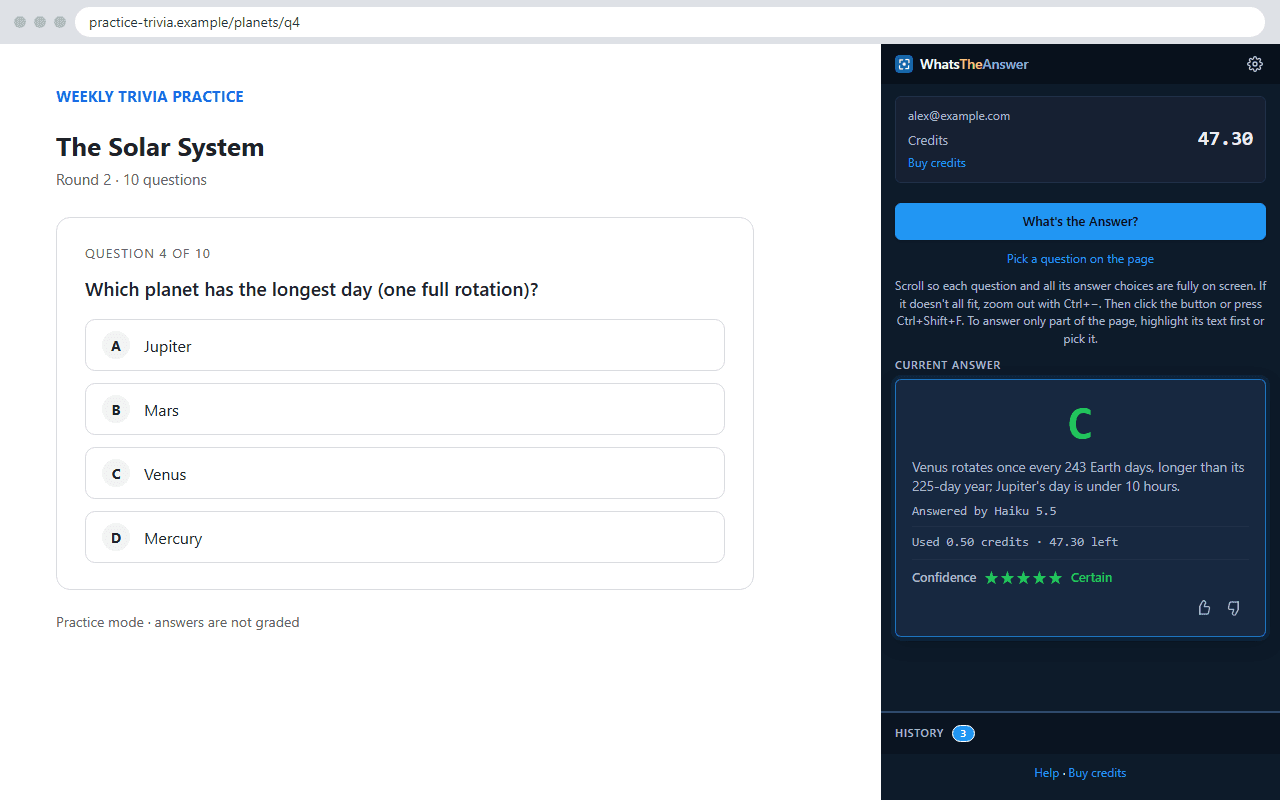
WhatsTheAnswer reads the question and every answer choice straight from your screen, including diagrams, equations, tables and images, so there is no copy and paste. Open any online quiz, press one shortcut, and the answer appears in your browser's side panel.
Works in Chrome, Edge, Brave, Opera, Vivaldi and Arc. Not Firefox or Safari.
For studying and practice only, not real exams. Acceptable use
One shortcut, any quiz site
The side panel stays open beside the page, so you never switch tabs. Scroll so the question and its choices are on screen, then click What's the Answer? or press Ctrl+Shift+F (Command+Shift+F on a Mac). The answer comes back in seconds.
There is nothing to connect and no per-site setup. Quiz platforms, trivia sites, flashcard decks, course quizzes and training modules all work the same way, because the AI quiz solver reads the screen rather than the page's code.
Why not copy and paste?
Quizzes are full of things that don't copy: a figure in a geometry question, a formula, a chart, or answer choices that are pictures. Pasting loses them, so you end up screenshotting or describing them by hand. Reading the screen means the AI quiz solver sees what you see. For a closer look, see WhatsTheAnswer vs copying questions into ChatGPT.
Quick trivia, too
An online trivia tool needs to be quick, and a side panel is. Use it for practice rounds, general-knowledge quizzes and settling a friendly argument without leaving the page. Each answer comes with a short reason, so you learn something even when the question was a guess.
You pick the AI model
Start with the fastest, cheapest AI model. If it is unsure (3 stars or fewer), a stronger AI model you have allowed gives a second opinion, and the panel says so. You can change either one in Settings and it applies to your next question.
Even the top frontier AI model costs only a few cents per answer, so you can use it whenever a question is hard. Compare them in the AI model guide. There is no subscription, credits never expire, and we never store your questions.
Common questions
What is an AI quiz solver?
An AI quiz solver reads a multiple choice question and picks the best answer. WhatsTheAnswer does it from your screen: it reads the question and every choice as you see them, then returns an answer, a one-line reason and a 1 to 5 star confidence rating.
Does it work on any quiz website?
It works on any page you can open in a Chromium browser such as Chrome, Edge or Brave, because it reads what is on screen rather than connecting to the site. If the question doesn't fit on screen, zoom out first.
How fast is it, and what does it cost?
Most answers arrive in seconds. A fast answer costs about 1 to 2 cents, and there is no subscription. Credits never expire. The exact cost shows under every answer.
Can I use it on a real exam?
No. It is for studying and practice. Don't use it on a real exam, or anywhere your school, employer or exam provider prohibits outside help. See acceptable use.
Answers are AI-generated and can be wrong. Use the confidence rating and your own judgement. Not affiliated with any school, exam board or quiz site.
Try it on your next practice quiz
Works in Chrome, Edge, Brave, Opera, Vivaldi and Arc. Not Firefox or Safari.